The short answer
Amazon doesn’t support rebrands on an existing ASIN, so a case asking to “change the brand” gets closed, even when the name is yours. Stop re-arguing in the same queue. Re-file it as a correction of a brand changed without permission, use Report abuse for Brand Registry contributions, and ask for the catalog team with real packaging proof.
The reply finally arrives. Brand changes on existing ASINs count as rebranding, it says, and rebranding isn’t supported. Create a new ASIN. Case closed.
You didn’t ask for a rebrand. You asked for your own name back. It’s not your fault, and it’s not the end of the case.
My co-founder Ahmad asks the obvious question in his tutorial on this: if rebranding isn’t allowed, how was someone else able to change the brand name? It’s a fair point, and it has an answer. Here’s what actually happens inside that case, and how we get it out of the loop.
Why does Amazon treat my hijack like a rebrand?
Start with Amazon’s rule. On an existing ASIN, Amazon allows only minor brand corrections: typos, capitalization and legal abbreviations. Anything bigger is treated as rebranding, it isn’t supported, and Amazon tells you to create a new ASIN. Its detail page rules also say never to modify the trademark information on an existing ASIN.
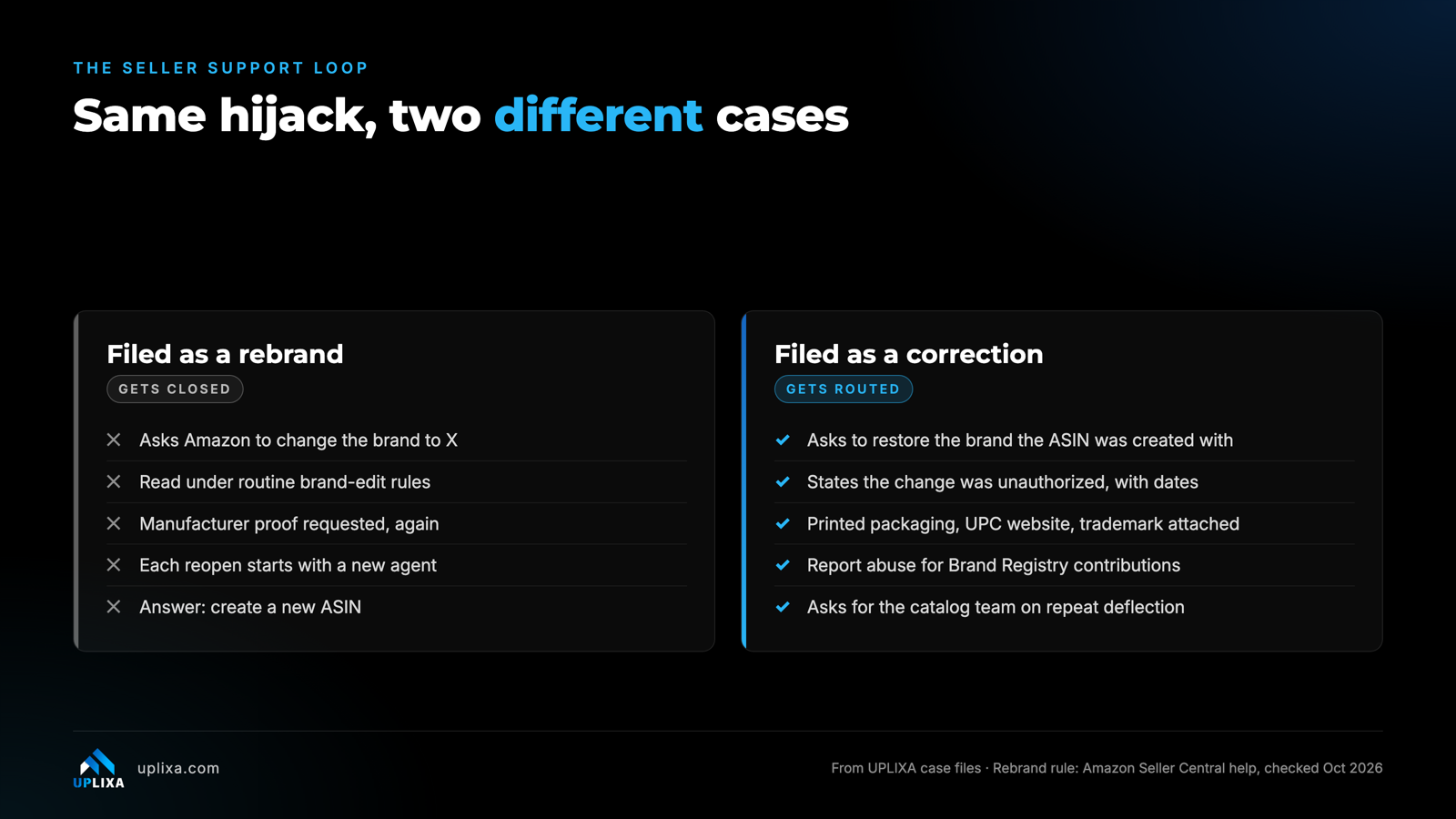
Now read your own case the way an agent does. “Please change the brand on these ASINs from X to Y” matches that rebrand pattern exactly, so the agent applies the rule. Same as a mailroom that sorts by the first line. A letter that opens with “change the brand” goes on the rebrand pile, whatever the rest of it says.
Two more things keep the loop going:
- Edit rules. Seller Support handles the request as a routine brand edit, and edit rules ask for manufacturer proof.
- No continuity. One agent asks for proof. You send it. A different agent reopens the case, asks again and closes it.
Amazon’s help pages also carry the exception you need. Amazon says that if you have evidence a brand was updated incorrectly, you can request a catalog review through the “Brand – update” option in Get Help. Your case has to read as that exception from its first line.
Can Seller Support even fix a hijacked brand?
Sometimes not. Amazon says Selling Partner Support can’t edit Brand Registry contributions and points you to Report abuse instead. If the other party made the change through Brand Registry, front-line support cannot undo it, however much proof you send. In Ahmad’s experience, agents often send you back to Report abuse for exactly this kind of case.
So, use both routes, in this order:
- Use Report abuse in Seller Central: Performance → Account Health → Report abuse. If you own the brand but don’t sell on Amazon, use Brand Registry Support → Contact us → Report a marketplace policy violation.
- Request a catalog review through Get Help → “Brand – update”, written as a correction.
One exception. Amazon won’t mediate between users of the same brand. If the change came from someone inside your own Brand Registry account, such as a former agency or partner, fix the access instead of filing a hijack case.
What should the case say instead?
Re-route, don’t re-argue. Sending the same request to the same queue with more attachments rarely changes the answer. Change the framing.
- Say what happened. The brand on these ASINs was changed without your authorization, from your brand to another name, first seen on a given date.
- Ask which brand each listing was created with. Ask the agent to check this before you ask for anything. It puts the original contribution on the record.
- Ask to restore it. Use “restore” and “correct”. Never “change”, “update to” or “rebrand”. State plainly that you created the listing.
- Attach the evidence once, in full. Real photos of packaging with the brand printed and the UPC visible, a website showing each product with its UPC, your trademark certificate as a PDF and your Brand Registry approval email.
- Quote every earlier case ID, so the next agent sees the history.
- Save the transcript and log Amazon’s exact rejection wording. The next filing depends on it.
How do you get the case to Catalog Integrity and Brand Protection?
These are internal Amazon teams. We haven’t found a public form with either name on it. Amazon’s documented routes are Report abuse, Brand Registry Support and the “Brand – update” catalog review.
In our cases a hijack reaches those teams when two things are true. The case is framed as an unauthorized change to your brand, backed by your trademark and Brand Registry position. And after a repeat deflection, you ask the agent to transfer it to the catalog or brand team instead of closing it.
Expect several cases before one lands. On one account Ahmad shows in his video, we opened around five. From our end, we reply to every Amazon message within 48 hours, because a case left silent can close.
Where this goes wrong
- Using the word “rebrand” yourself. Or “update the brand to”. It hands the agent the reason to close.
- Accepting “create a new ASIN”. Amazon measures reviews per ASIN, so a new ASIN starts with none, and the hijacked listing keeps the wrong brand.
- Sticker photos or mock-ups. For Brand Registry, Amazon says stickers and labels don’t count, and its brand-name rules rule out CGI and edited images. Never send AI images.
- Opening duplicates. Brand Registry has told our team not to open duplicate cases while the first is pending. Wait for the reply, then open a fresh case quoting the old ID.
- One case for several marketplaces. File once per marketplace.
From our case files
What happened with Medi-Aid?
Medi-Aid (PILL THING) vs Baobang, US. Baobang replaced Medi-Aid’s brand name on its listings. Seller Support kept denying our requests as rebranding requests. We stopped arguing in that queue, built the case to show an unauthorized brand replacement, and escalated it to Catalog Integrity and Brand Protection. The Medi-Aid brand name was restored on the affected listings, the FBA restrictions were lifted and Baobang was removed from the listings.
The US party-décor brand from our other case went the same way. After pushback on days 6 to 9, we re-routed the case. It was with Amazon’s internal catalog team by day 19, and the brand was restored on day 20. Across our brand hijack work we have recovered 1,000+ listings, and every timeline depended on Amazon.
FAQ
Why does Seller Support keep asking for more proof?
Because the case is being read as a routine brand edit, and edit rules ask for manufacturer proof. Each reopen can land with a new agent who starts over. Send the full evidence pack once, quote earlier case IDs and ask for a transfer to the catalog team.
Seller Support told me to create a new ASIN. Should I?
Not for a hijack. Amazon’s new-ASIN rule is for genuine rebrands. A new ASIN starts with no reviews, and your original listing keeps the wrong brand.
Can I open a new case every time one gets closed?
Yes, once the earlier one has closed. Quote every previous case ID. In our cases, if a report is denied or silent by day 5, we open a fresh case that references the original.
Does a registered trademark stop them calling it a rebrand?
It helps the framing. A trademark proves who owns the name, though, and the catalog team also wants proof of which products carry it. Pair it with packaging photos and a product website.
About UPLIXA. UPLIXA is a compliance-first Amazon agency founded in 2021. We have worked with 80+ brands across the US, UK and Germany and handled 5,000+ listings across our services, from compliance and listing reinstatement to brand protection and brand name recovery.