Amazon is asking for an organic certification. Or an EPA registration number for a pesticide claim. Or for documentation behind a Non-GMO claim. What if your product doesn’t require any of these? Many Amazon sellers are facing this issue. Amazon is flagging certifications that may not be applicable to your product. They’re also asking for certifications that have already been submitted. All of this results in a listing that remains inactive, no sales are made, and your inventory is taking up storage space.
We’re going to explain some of the reasons Amazon flags unnecessary certifications, the solutions that vary by situation, and how to challenge a request that’s not applicable to your product.
Why Does Amazon Ask for a Certification Your Product Doesn't Need?
Some Amazon’s certification requirements are triggered by claims made in your product listing. These claims can be found in your product’s title, bullet points, description, A+ content, product images, or product packaging.
There are 3 main situations that can lead to certification requests.
1. Organic Claims and USDA Certification
In the case of agricultural products in the United States, if a product is labeled, sold or represented as “organic”, “made with organic ingredients” or similar, it needs to be certified under USDA organic regulations or equivalent standard recognized by USDA. The applicable certifier also needs to be disclosed. Amazon’s claims policy states that claims such as “100% organic” require supporting evidence.
Requirements in the UK differ from the U.S. Generally, in the UK, organic food sellers must have product certification in their own company name by a UK-recognized control body. An exemption should only be relied upon if there is written confirmation from a recognized control body.
2. Pesticide and Antimicrobial Claims
Amazon may classify a product as a pesticide if its listing contains claims of antimicrobial, antifungal, antibacterial, anti-mold, or other similar claims.
For example, words like “removes”, “blocks”, “neutralizes”, and “prevents” may indicate an antimicrobial claim. Claims like “sanitizes” or “disinfects” or “sterilizes” are obvious indicators of an antimicrobial claim.
“Prevents” or “removes” mold or mildew are also claims that would make the product subject to this requirement.
Also included are devices like water- or air-treatment products or their filters.
Examples provided by Amazon include socks that are claimed to be antimicrobial and pillowcases that are claimed to be dust mite resistant.
3. Non-GMO Claims on Dietary Supplements
Listings of dietary supplements that make Non-GMO claims may be required to provide supporting documentation. The documentation must be product-specific and relevant.
In general, a broad certificate or report may not be sufficient to support the claim if it does not identify the specific product.
Acceptable documentation may include the following:
- A product-specific Non-GMO Project Verified certificate.
- A product-specific Nutrasource IGEN certificate.
- A PCR report issued by an ISO 17025 accredited lab in the last 12 months.
- A USDA Organic certificate.
4. A Word You Didn't Intend as a Product Claim
Sometimes, the word that triggers an exam is totally unrelated to the features or marketing of the product. For example, in the case of Natural Charcoal, the flagged word was in the brand name. That’s why it’s important for sellers to review the entire listing to determine where the problem is, rather than assume it’s confined to the product description.
Which Fix Applies to Your Amazon Certification Flag?
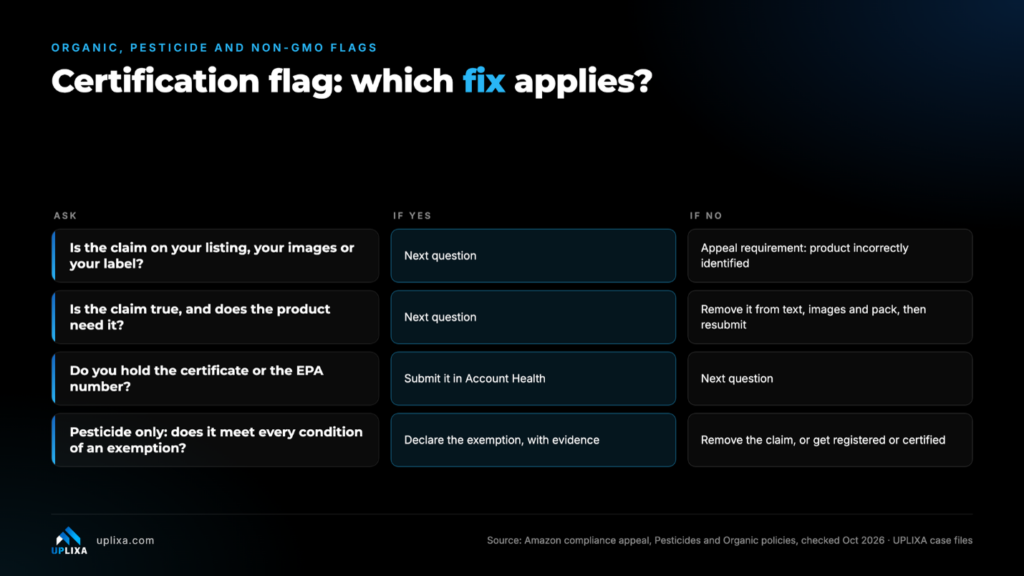
The correct solution depends on the reason for requiring the solution. Generally speaking, there are four paths.
1. The Claim Is Accurate and You Have the Required Documentation
If the product does make a regulated claim and you have the required documentation, you can submit the documentation through Seller Central. The general process is:
- Open Account Health.
- Go to Product Policy Compliance.
- Select the related policy issue.
- Click Submit.
- Click Add Compliance for this Product.
- Upload the required documentation.
For pesticide-related products, Amazon may also require the Pesticide Marking attribute.
This may require:
- EPA Registration Number: Numbers only for products containing a pesticide with an active ingredient.
- EPA Establishment Number: Letters and numbers for a pesticide device.
- Both, if applicable.
2. The Claim Appears on Your Listing but Isn't Necessary
Remove wording from the product listing that triggers the issue. Eliminating a word from the product title may not address the concern if the claim is made on packaging or product images. See Amazon’s guidance on removal of pesticide claims for further clarification.
Check all listing content, including:
- Product title
- Bullet points
- Description
- A+ Content
- Product images
- Packaging
3. Your Pesticide Product Qualifies for an Exemption
Certain pesticide-related products may be exempt from EPA registration.
These include:
Treated Articles: A product treated with a pesticide where the treated article protects itself and no public health claims are made.
Minimum Risk Pesticides: Certain products may qualify for exemption if they meet all six conditions.
Products Not Requiring EPA Registration: Certain products may not require an EPA registration based on their classification and applicable rules.
4. You Never Made the Claim or the Requirement Was Applied Incorrectly
If your product does not make the claim, and does not fall under the certification requirement, you may have to file an appeal. A clear, reasonable explanation, with supporting documents, is much better than just stating “Amazon got this one wrong.”
Follow the appeal path in Account Health:
- Open the relevant Product Policy Compliance issue
- Select Appeal Requirement
- Select the reason that best describes your situation.
- Explain why the certification does not apply. If your product was incorrectly identified, state why and provide any additional information that supports your case.
- Upload any supporting evidence.
How to Appeal an Amazon Certification Flag Applied in Error
Although Amazon does not disclose the complete details of its review process for internal appeals, having an organized, evidenced-based process can help sellers prepare their cases in a more structured
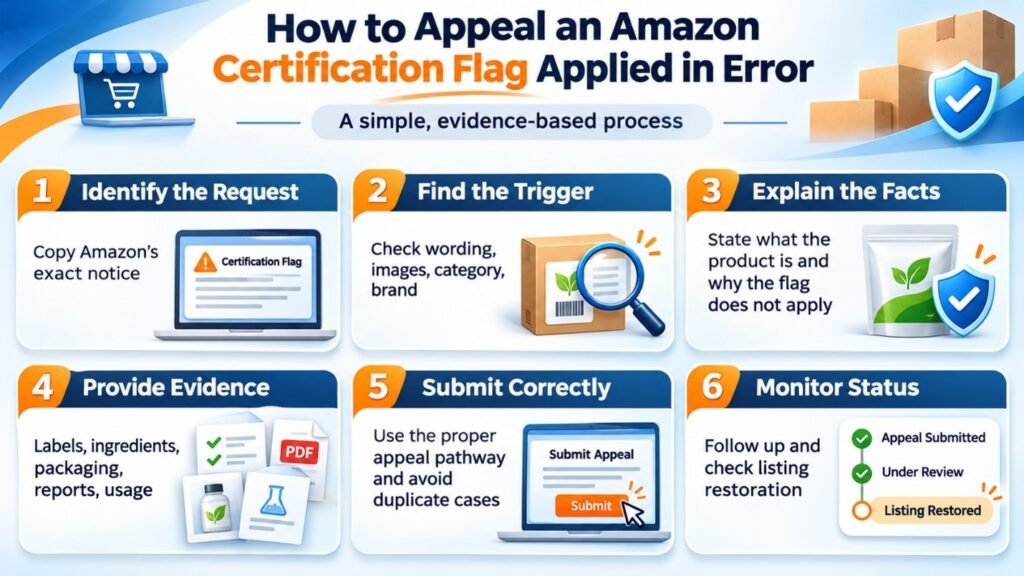
The process outlined below is what we do when handling these types of cases.
1. Identify Exactly What Amazon Is Asking
Copy the word-for-word request or policy notification from Amazon.
Look through every place where the flag appears to understand what Amazon is asking for to avoid an irrelevant appeal.
2. Locate the Actual Trigger
Review your entire product listing and identify what may have caused the flag.
Potential triggers may be:
- A word or phrase.
- An image.
- How a product is classified.
- A brand name.
- Another seller’s contribution to a shared listing.
3. Acknowledge the Flag and Explain the Facts
Stating Amazon made a mistake and launching into a lengthy justification is not necessary. Explain what your product is, what claims the product makes, and why the requested certification does not apply.
4. Provide Evidence
Your appeal should include:
- Photos of the product label.
- Ingredient lists, if applicable.
- Packaging photos.
- Relevant certificates, reports or lab tests.
- A clear description of how the product is to be used.
- Support showing that the flagged claim does not apply.
5. Submit Through the Correct Pathway
Do not create multiple cases for the same issue. Make sure your communication is clear and organized, and submit your appeal through the correct pathway for your account health.
6. Monitor Listing and Case Status
If a response from Amazon has not been received in a timely manner, be sure to follow up on the case. Check your product page and account health status. A case update does not always mean your listing has been fully restored.
Final Thoughts
Not every Amazon certification request means your product is non-compliant. Sometimes it’s a misinterpreted word, image, or incorrect product classification that prompts Amazon to send a request for additional information. The key is not to blindly provide a certificate of analysis, or appeal over and over again without understanding the reason for Amazon’s request. Identify what, specifically, is prompting Amazon’s request. Often, the correct course of action is to provide supporting documentation, remove illegal claims, establish a proper exemption, or challenge Amazon’s request with appropriate justification.
For sellers, doing this correctly can often mean the difference between a product listing that is immediately available for sale, vs. a listing that is not available for sale until the compliance issue is resolved.