Your top-selling supplement has been deactivated in Manage Inventory. Your Account Health flagged a policy violation. However, the notice doesn’t describe the claim, image, or document behind the decision. As a seller, the greater challenge is not getting a listing reinstated. It’s figuring out what caused the removal and protecting other ASINs from the same infraction. UPLIXA’s approach in evaluating supplement compliance is to examine the policy notice, supporting documents, product label and listing. The policy notice identifies the issue at hand, and it is the documents that help pinpoint the changes needed.
This blog will cover the common reasons for Amazon listing removal for dietary supplements, the policy documents Amazon evaluates, the tests and compliance requirements that can lead to supplement listing deactivation, and how to prevent the same issues from occurring to multiple ASINs.
How Does Amazon Identify a Dietary Supplement?
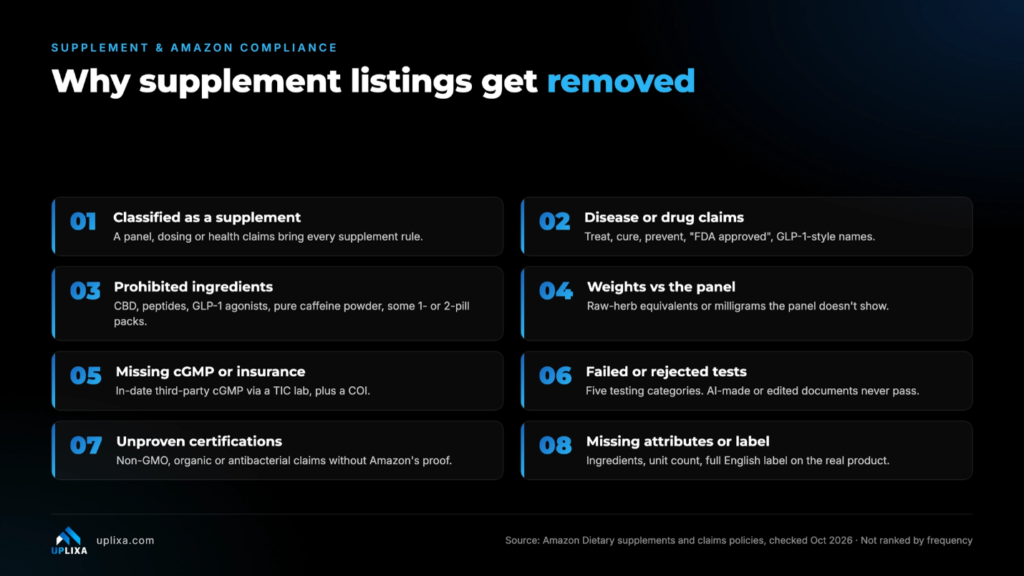
The presence of a Nutrition Facts panel does not preclude a product from being a dietary supplement. If the marketing and labeling of the product suggests the product is to be used as a supplement, and there are ingredients that are typically found in supplements, the product is a dietary supplement. The supplement category that a product is in may dictate the type of compliance requirements the product must abide by.
Common Indicators Include :
- Supplement Facts
- “Dietary Supplement”
- “Herbal Supplement”
- “Vitamin”
- “Mineral”
- Amoirds
- Botanicals
“Take two capsules daily.”
What Listing Claims Can Trigger Removal?
The following table highlights common supplement listing claims that may trigger Amazon policy violations or listing removal.
Policy Concern | What Can Trigger Removal? | Example / Red Flag |
FDA Approval Claims | Falsely claiming or implying FDA approval | “FDA Approved Supplement” |
Disease-Related Claims | Claiming to diagnose, treat, cure, or prevent diseases | “Cures Diabetes” |
Prescription Drug Claims | Comparing supplements to prescription drugs or mislabeling drugs as supplements | “Works Like Prescription Medicine” |
Steroid-Like Claims | Promising effects similar to anabolic steroids | “Legal Steroids” |
Misrepresentative Labels | Using labels indicating products are not intended for retail sale | “Tester” / “Not for Retail Sale” |
Disease-Related Keywords | Adding disease-related terms to backend search keywords | “Cancer Treatment” |
Misleading Ingredient Quantity | Exaggerating ingredient amounts or omitting required ingredient information | Claiming 500 mg when the product contains 250 mg |
What Documents, Tests and Labels Must Sellers Provide?
Documentation may show that a listing is not in violation of certain policies, but if inconsistent tests are done on the product or if the product contains misleading ingredients, the listing may be removed.
i. Manufacturing and cGMP Documentation
US regulations for supplements manufactured under current good manufacturing practice (cGMP) are found in 21 CFR Part 111. For food manufacturing under cGMP, refer to 21 CFR Part 117.
Documents submitted must be in accordance with Amazon’s present requirements including any applicable third-party verification and/or authorized testing and inspection. Facility registration and certificate of compliance must be current, and details of requirements must be matched to your product category.
ii. Product Liability Insurance
Sellers must provide proof of product liability insurance with compliance requirements met, and submit a Certificate of Insurance via Amazon’s verification process.
The business insured, terms of the policy, and coverage must meet the requirements. An insurance document that doesn’t meet Amazon’s requirements will not resolve the issue.
iii. Laboratory Testing
Additional tests may be required to ensure that the supplements do not contain heavy metals, microbial contamination or adulterants.
Amazon may require tests or provide documentation for other products. Listing a product that does not meet Amazon’s requirement will result in that product being removed.
iv. Authentic Documents and Product Images
Supporting records must be genuine and unaltered. Amazon may reject records that do not meet its requirements for authenticity, including the use of computer-generated or AI-generated records. Product images must show the product and its packaging, and include all labeling and information in English, including:
Supplement Facts and ingredients
- Dosage and usage
- Directions for use
- Warnings and advisories
To view a larger version of the images, click on the images.
- Certification marks and label information.
- Lot codes, if applicable.
- Name and address of the brand owner, manufacturer, packer and/or distributor.
Why Can Certain Terms Cause Issues?
Certain words can introduce documentation requirements or alter how Amazon reviews a product.
Non-GMO: Amazon may require a certificate identifying the specific product or an appropriate PCR laboratory report. Check the present rules for the report’s validity and required issue date.
Organic: Products making organic claims may require an USDA organic certification, as applicable, with the certifier identified per Amazon.
Antibacterial, antimicrobial and antifungal: These may raise concern for regulation of pesticides, depending on product and intended use. They may also touch on claims that are restricted by Amazon for supplements. Claims and evidence must be aligned across the product, and support product images and packaging. A claim that may appear to be benign in a graphic can still cause an issue.
In Seller Central, where would I find the removal notice?
Look in the places where Amazon records listing and policy concerns:
Account Health: Review Product Policy Compliance for listings with Food and Product Safety Issues or Restricted Product Policy Violations (if applicable).
Manage All Inventory: Check the listing status and/or compliance or deactivation message.
Activate Listings: Look for requests to provide information or resolve an outstanding issue.
Performance Notifications: Read the full notice and/or any instructions regarding the documentation, appeal, or corrective action.
Save the wording from each notice: If there are differences between the notices, save both, rather than assuming one replaces the other.
This helps determine if the concern relates to a prohibited claim, missing document, laboratory testing, product identity, or some other policy requirement.
Common Mistakes That Make Compliance Problems Worse
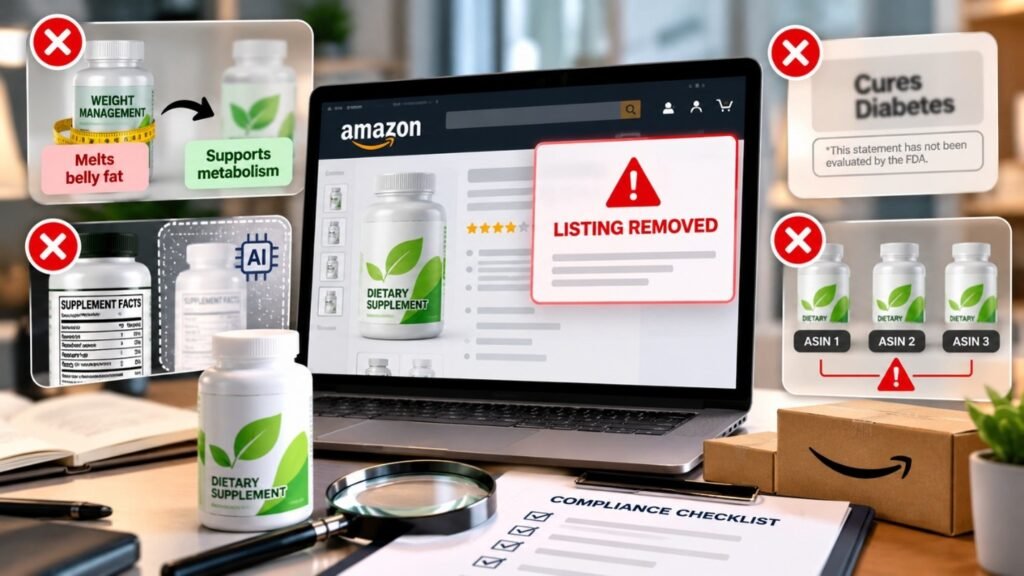
1. Rewriting a Claim without Checking the Category
Replacing “Melts belly fat” with “Supports metabolism” does not automatically fix a policy concern. In this example, the revision may still place the product in the weight management category or require further review.
2. Using a Rendered or AI-Generated Label
A graphically pleasing image can not replace an actual picture of a product and its label. If the Supplement Facts panel, ingredient quantities or warnings shown in an image do not align with the physical label of the product, this can create a policy concern as well.
Review and analyze all visible details of a product and its label, and use actual product images prior to submission.
3. Adding a Disclaimer Instead of Removing a Prohibited Claim
Disclaimers do not render previously prohibited claims acceptable. The underlying claims must be removed or corrected in order for the disclaimer to be acceptable.
4. Correcting One ASIN While Ignoring Similar Listings
Disparities in description, image or ingredient claims may be present in multiple ASINs. Investigate related products for the same discrepancies as opposed to only modifying the listing which received the first notice.
How to Approach an Amazon Supplement Listing Removal
A structured approach helps sellers concentrate on the real compliance concern rather than arbitrary changes.
- Identify the stated violation. Locate pertinent communications in Account Health, Manage All Inventory and Performance Notifications.
- Inspect the entire listing. Consider claims, images, keywords, ingredients, quantity and packaging.
- Evaluate the evidence. Check certificates, laboratory reports, manufacturing documents, insurance and other relevant documents.
- Correct the Root Issue. Correct or remove claims as needed, and provide missing information.
- Check related ASINs. Look for the same issue in the seller’s catalog.
- Follow Amazon’s resolution process. Provide the information they request or appeal with evidence supporting your claim, following the instructions in the notice.
Final Thoughts
Compliance with Amazon for supplements is more than just writing compliant product descriptions. There are claims, ingredient amounts, packaging, laboratory test reports and manufacturing records to align with the applicable requirements. When a listing is removed, the first step to a complete correction is identifying the exact reason for removal. Recurring issues in related ASINs can give other sellers opportunities to address similar issues rather than dealing with individual notices. At UPLIXA, our strategy is to review the evidence, identify the compliance gap, and help the seller decide the best course of action. The goal is to solve the problem as accurately as possible, not just make the listing look compliant.